Budget DDR4 should extend the life of a compatible PC, not create another troubleshooting project
The strongest value in 2026 is usually a matched 32GB kit with two 16GB modules, DDR4-3200 CL16 or DDR4-3600 CL18, a documented XMP profile, and confirmed motherboard support. The five options below are current product families, but the final winner should be whichever compatible kit offers the best local price when the purchase is made.
The shortlist in one minute
All five selections use ordinary desktop DDR4 U-DIMMs and are available in two-module configurations. They are not ranked by an invented benchmark score or a temporary sale price.
Instead, each recommendation fills a clear role: lowest-cost balanced kit, low-profile option, broadly supported mainstream choice, higher-speed value option, or alternative worth considering when a retailer discounts it below the better-known competitors.
The article focuses on 32GB because buying 16GB only to replace it shortly afterward can erase the original saving. A 16GB kit remains reasonable for an office PC, secondary system, light gaming machine, or strictly limited budget.
How the five kits were selected
An active official product page
Each selected family remained listed by its manufacturer when this guide was updated. Products limited to old marketplace listings were not treated as dependable long-term recommendations.
A 32GB two-module configuration
Comparing 2 × 16GB kits prevents a cheap 16GB package from appearing more attractive merely because it contains half as much memory.
DDR4-3200 CL16 or DDR4-3600 CL18
Both specifications provide approximately 10 nanoseconds of calculated CAS-only latency while avoiding the platform demands of extreme DDR4 overclocking profiles.
Non-RGB designs and manageable module height
Decorative lighting can be worthwhile in a visible build, but it should not consume the limited budget before capacity, compatibility, and cooler clearance are secured.
Documented XMP and manufacturer resources
A product page, specification sheet, QVL, configurator, warranty, or support system provides more useful evidence than an incomplete marketplace title.
No permanent street-price claims
DDR4 pricing and availability vary by region, retailer, remaining stock, and production changes. The correct choice may change without the technical specifications changing.
Top five budget-friendly DDR4 kits
32GB, 2 × 16GB, DDR4-3200 CL16, 1.35V
Best overall value32GB, 2 × 16GB, DDR4-3200 CL16, 1.35V
Best cooler clearance32GB, 2 × 16GB, DDR4-3200 CL16, 1.35V
Best mainstream support32GB, 2 × 16GB, DDR4-3600 CL18, 1.35V
Best higher-speed option32GB, 2 × 16GB, DDR4-3200 CL16, 1.35V
Best sale-price alternative| Recommended kit | Reference specification | Calculated CAS-only latency | Profile | Primary advantage | Main caution |
|---|---|---|---|---|---|
| TEAMGROUP T-Force Vulcan Z | TLZGD432G3200HC16FDC01, 32GB, 2 × 16GB, 3200 CL16, 1.35V | Approximately 10 ns | Intel XMP | Straightforward specification that is frequently positioned as a value kit | Several similar part numbers and color variants exist; verify the complete code |
| Corsair Vengeance LPX | CMK32GX4M2E3200C16, 32GB, 2 × 16GB, 3200 CL16-20-20-38, 1.35V | Approximately 10 ns | Intel XMP 2.0 | Low-profile aluminum design for large air coolers and compact cases | The family contains many capacities, timings, and revisions with similar names |
| Kingston FURY Beast | KF432C16BBK2/32, 32GB, 2 × 16GB, 3200 CL16-20-20, 1.35V | Approximately 10 ns | Intel XMP; Ready for AMD Ryzen | 34.1 mm low-profile heat spreader and extensive manufacturer support resources | Do not confuse a kit of two with a single 32GB module or four-module package |
| G.SKILL Ripjaws V | F4-3600C18D-32GVK, 32GB, 2 × 16GB, 3600 CL18-22-22-42, 1.35V | Approximately 10 ns | Intel XMP 2.0 | Additional theoretical bandwidth without increasing calculated CAS-only latency | Rated speed requires compatible hardware and BIOS configuration |
| Patriot Viper Steel | PVS432G320C6K, 32GB, 2 × 16GB, 3200 CL16, 1.35V | Approximately 10 ns | Intel XMP 2.0 | Useful alternative when priced below the more familiar brands | The tall steel-style heat spreader requires a cooler-clearance check |
TEAMGROUP T-Force Vulcan Z 32GB DDR4-3200 CL16
A conventional non-RGB kit that places the budget into capacity and mainstream performance rather than lighting or extreme frequency.
The Vulcan Z earns the first position because its target specification is difficult to improve upon for an ordinary DDR4 upgrade. It provides 32GB across two modules, a 3200 MT/s profile, CL16 latency, and a simple heat-spreader design.
TEAMGROUP lists several 3200 CL16 variants with different color and timing suffixes. This makes the complete product code important. Confirm that the retailer is selling a two-module 32GB package rather than one 32GB module or a visually similar 16GB kit.
The kit makes the most sense for an AM4 gaming PC, Intel DDR4 motherboard, office workstation, family desktop, or content-creation system that needs additional capacity without a platform replacement.
Corsair Vengeance LPX 32GB DDR4-3200 CL16
A long-running low-profile DDR4 family that remains useful where a tower cooler overlaps the memory sockets.
Vengeance LPX is the strongest choice when physical clearance is part of the decision. Corsair describes the family as low profile, which can help beneath wide dual-tower CPU coolers or inside compact cases.
The reference kit uses a 3200 CL16 profile with tested timings of 16-20-20-38 at 1.35V. The rated configuration requires XMP or an equivalent motherboard setting; at default BIOS settings, the system may initially use a lower standardized profile.
The family has existed for many years and contains numerous part numbers. Buyers should avoid assuming that every “Vengeance LPX 3200” listing has the same capacity, timings, module count, color, or internal revision.
Kingston FURY Beast 32GB DDR4-3200 CL16
A compact performance kit backed by clear part-number documentation, compatibility tools, and a limited lifetime warranty.
Kingston FURY Beast is a practical recommendation for buyers who value documentation and a compact module. Kingston lists the family at 34.1 mm high, provides exact data sheets, and offers a system scanner and part-number search.
The reference 32GB kit contains two 16GB modules and uses a DDR4-3200 CL16 profile at 1.35V. Kingston also lists 3600 MT/s models, larger capacities, single modules, and four-module kits under the same family.
“Ready for AMD Ryzen” and XMP support do not replace motherboard validation. The exact CPU, board, BIOS, capacity, and module layout still determine whether the selected profile operates reliably.
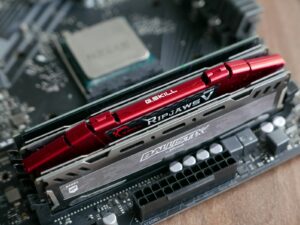
G.SKILL Ripjaws V 32GB DDR4-3600 CL18
A sensible step above 3200 MT/s when the motherboard supports it and the price remains close to a comparable CL16 kit.
DDR4-3600 CL18 provides more theoretical bandwidth than DDR4-3200 CL16 while producing the same approximate 10-nanosecond CAS-only calculation. That makes this Ripjaws V kit attractive when it costs only slightly more and appears on the motherboard support list.
The additional frequency is not automatically useful on every processor. Older Ryzen and Intel memory controllers may operate more reliably at a lower setting, and some locked or OEM systems do not provide the necessary XMP controls.
G.SKILL lists a 42 mm module height. Although the company positions it for use with large coolers, the exact cooler specification and fan position should still be checked before ordering.
Patriot Viper Steel 32GB DDR4-3200 CL16
A fully specified non-RGB kit that becomes compelling when a local retailer prices it below the better-known alternatives.
Patriot lists the Viper Steel family in several DDR4 frequencies, capacities, and module arrangements. The PVS432G320C6K reference is the relevant budget specification: two 16GB modules, 3200 MT/s, CL16, and 1.35V.
The kit does not provide a unique performance advantage over the other 3200 CL16 selections. Its value comes from competition: when it is materially cheaper and compatible with the system, paying more for a different logo may provide no useful benefit.
The steel-style heat spreader is more prominent than the Corsair and Kingston low-profile designs. Builders using a large front CPU-cooler fan should verify the available vertical clearance.
Use two simple calculations before comparing prices
Compare kits with the same capacity first. A 16GB package should not appear to defeat a 32GB kit merely because its checkout total is lower.
DDR4-3200 CL16 and DDR4-3600 CL18 both calculate to approximately 10 nanoseconds. This formula does not measure complete system latency.
Should a budget PC use 16GB or 32GB?
Still workable for controlled use
- Entry-level gaming without heavy mods or background tools
- Office applications, browsing, communication, and media
- A secondary or family computer
- A strict budget with a confirmed future upgrade path
- Systems whose workloads remain comfortably below the limit
The stronger general DDR4 purchase
- Modern gaming with browsers, launchers, chat, and capture tools
- Photo editing, lighter video work, and content creation
- Development tools, local services, and moderate virtual machines
- Heavy browser and office multitasking
- Extending the useful life of an existing AM4 or Intel DDR4 platform
Compatibility checks that matter more than the ranking
DDR4 and DDR5 are not interchangeable. Some Intel processor generations were paired with either DDR4 or DDR5 motherboards, but each individual board supports only its designed memory type.
Record the complete model and hardware revision, then download its manual and current memory-support list from the manufacturer.
Confirm that the board, processor, BIOS, and operating system support 32GB in the selected two-module arrangement.
A2 and B2 are common for two modules on four-slot desktop boards, but the diagram in the exact motherboard manual is the final authority.
Retail gaming kits may require XMP, DOCP, A-XMP, or another manufacturer-specific BIOS label to reach their advertised profile. Some OEM desktops expose no memory-overclocking control.
Wide tower coolers can overlap the first memory sockets. Compare the module height with the cooler specification and front-fan position.
A QVL represents configurations tested by the motherboard manufacturer; it cannot include every kit produced. An exact listing is useful evidence, not the only possible path to compatibility.
A 2026 market note: current stock matters
DDR4 is a mature product, but local supply, clearance inventory, manufacturing priorities, import costs, and retailer stock can still change the ranking.
Micron ended Crucial consumer-channel shipments in February 2026. Existing Crucial DDR4 can still be a reasonable discounted purchase, and Micron stated that warranty service and support would continue.
An expensive DDR4 kit may no longer make sense when the complete motherboard, processor, and DDR5 memory platform upgrade is already planned.
Old inventory, marketplace imports, incomplete titles, and mixed listings increase the value of a straightforward return policy.
Installation and stability checks
Save the original configuration
Record the BIOS version, current memory capacity, populated slots, active profile, and original module part numbers.
Disconnect power completely
Shut the system down, unplug it, control static electricity, and follow the motherboard manual when installing the modules.
Boot at default settings
Confirm that BIOS detects the complete 32GB capacity before enabling an XMP or manufacturer memory profile.
Enable only the intended memory profile
Avoid combining the RAM installation with CPU overclocking, automatic tuning, manual timings, or arbitrary voltage changes.
Run a reputable memory test
Investigate any repeatable error. A system that reaches Windows is not automatically stable.
Test cold boots and normal workloads
Use games, editing projects, compilers, archives, sleep and resume, and repeated restarts before trusting the configuration.
Common budget-RAM mistakes
Buying one 32GB module without planning to add another
A single module can reduce available memory bandwidth on a mainstream dual-channel platform compared with a matched 2 × 16GB kit.
Mixing two separate packages
Modules with the same visible brand and speed may use different chips, revisions, ranks, or SPD programming.
Comparing 3200 CL16 with 3600 CL18 by CL alone
Both calculate to approximately 10 nanoseconds of CAS-only latency. The 3600 kit provides more theoretical bandwidth.
Assuming XMP is guaranteed
XMP is an overclocked memory profile whose result depends on the CPU, motherboard, BIOS, capacity, module count, and complete kit.
Ignoring module height
A cheaper kit is not useful when its heat spreader prevents the CPU cooler or front fan from fitting correctly.
Buying server memory for a consumer board
Registered, buffered, or unsupported ECC modules may resemble ordinary DDR4 but remain electrically incompatible.
Choosing the cheapest unknown marketplace listing
Counterfeit labels, incomplete specifications, used modules, and weak return support can remove the apparent saving.
Paying more for unused frequency
A locked OEM system or older memory controller may run an expensive 3600 kit at a lower speed.
Frequently asked questions
What is the best budget DDR4 specification in 2026?
For many gaming and general-purpose desktops, a matched 32GB 2 × 16GB DDR4-3200 CL16 kit provides the strongest balance of capacity, latency, availability, and setup difficulty. DDR4-3600 CL18 is attractive when it costs only slightly more and the platform supports it.
Is 16GB DDR4 still enough?
It remains workable for office use, browsing, lighter gaming, and controlled multitasking. A new 32GB purchase is more comfortable for modern gaming, creation, development, heavy browsers, and longer-term use.
Is DDR4-3600 CL18 faster than DDR4-3200 CL16?
It provides more theoretical bandwidth, while both specifications calculate to approximately 10 nanoseconds of CAS-only latency. The practical difference depends on the processor, motherboard, full timings, application, and stability.
Will DDR4-3600 work on every AM4 motherboard?
No. Results depend on the processor generation, motherboard, BIOS, memory controller, capacity, and kit. Some systems may require a lower frequency to remain reliable.
Can DDR4 memory be installed in a DDR5 motherboard?
No. DDR4 and DDR5 use different electrical standards and physical key positions. A motherboard supports the generation for which its memory sockets were designed.
Should I choose one 32GB module or two 16GB modules?
Two compatible 16GB modules normally provide a balanced dual-channel configuration. One 32GB module may be reasonable when the system has only one available slot or a specific future upgrade plan.
Can I add another identical kit later?
It may work, but separately packaged kits are not guaranteed to operate together. Four modules also create a heavier electrical load and may require a lower data rate.
Why does new DDR4 run below the advertised speed?
The system commonly starts at a standard SPD setting. The advertised profile may require XMP, DOCP, A-XMP, or another BIOS option, and the motherboard and processor must support it.
Is used DDR4 worth buying?
It can be, provided the exact modules can be inspected, tested, returned when faulty, and verified as compatible. Avoid damaged contacts, mixed packages, missing labels, and unsupported server memory.
Should I buy remaining Crucial DDR4 stock?
It can still be a reasonable purchase when the exact module is compatible and clearly discounted. Micron ended new Crucial consumer shipments in February 2026 but stated that warranty service and support would continue.
Final recommendation
Start by comparing the five recommended products as 32GB two-module kits, not as family names or isolated advertised speeds. Verify the exact part number and confirm that the motherboard supports DDR4, the selected capacity, and the required memory profile.
TEAMGROUP T-Force Vulcan Z is the strongest overall value candidate when it is the lowest-cost compatible 3200 CL16 kit. Corsair Vengeance LPX deserves priority where cooler clearance is limited, while Kingston FURY Beast offers a compact design and extensive support resources.
G.SKILL Ripjaws V DDR4-3600 CL18 is worth the small premium when the platform supports it and the price remains close to 3200 CL16. Patriot Viper Steel is the alternative to watch when regional stock or a retailer discount makes it less expensive than the other four.
Buy sufficient capacity before paying for decorative lighting or extreme frequency. Install one matched kit, confirm the complete capacity at default settings, enable only the intended XMP profile, and investigate every repeatable memory-test error before trusting the computer with important work.
Official product and technical references
- TEAMGROUP T-Force Vulcan Z DDR4 product specifications
- Corsair Vengeance LPX CMK32GX4M2E3200C16
- Kingston FURY Beast DDR4 product family
- Kingston KF432C16BBK2/32 specification sheet
- G.SKILL Ripjaws V F4-3600C18D-32GVK
- G.SKILL motherboard QVL for the selected Ripjaws V kit
- Patriot Viper Steel DDR4 product specifications
- Micron announcement concerning the Crucial consumer business
- Intel Extreme Memory Profile information
- MemTest86 bootable memory diagnostic

Ivi RAM Boost Editorial Team prepares practical RAM upgrade, compatibility, performance, and troubleshooting guides using manufacturer specifications, operating-system documentation, platform documentation, and clearly identified secondary references. We do not claim physical testing or hands-on benchmarking unless an article explicitly documents that testing.